
- How to define Stability Criteria Details?
- Create Stability Criteria Details
- Remove Stability Criteria Details
How to define Stability Criteria Details?
Stability Criteria Details are the items that fall under each Stability Criteria Header and are essentially the items on each checklist, which need to be completed before a task starts.
The prerequisites to create a Stability Criteria Details is the Stability Criteria Header.
Example: There are 3 Stability Criteria Detail to be defined under the Drywall Stability Criteria Header.
- Design documents ready (8 weeks before starting the process or Fragnet Step)
- Issued for construction ready (6 weeks before starting the process or Fragnet Step)
- Material delivery confirmed (4 weeks before starting the process or Fragnet Step)

Create Stability Criteria Details
1. Go to Project Data from the Main Menu.
2. Go to Stability Criteria Details from the list of Project Data.
3. Click on New to create a new Stability Criteria Detail.

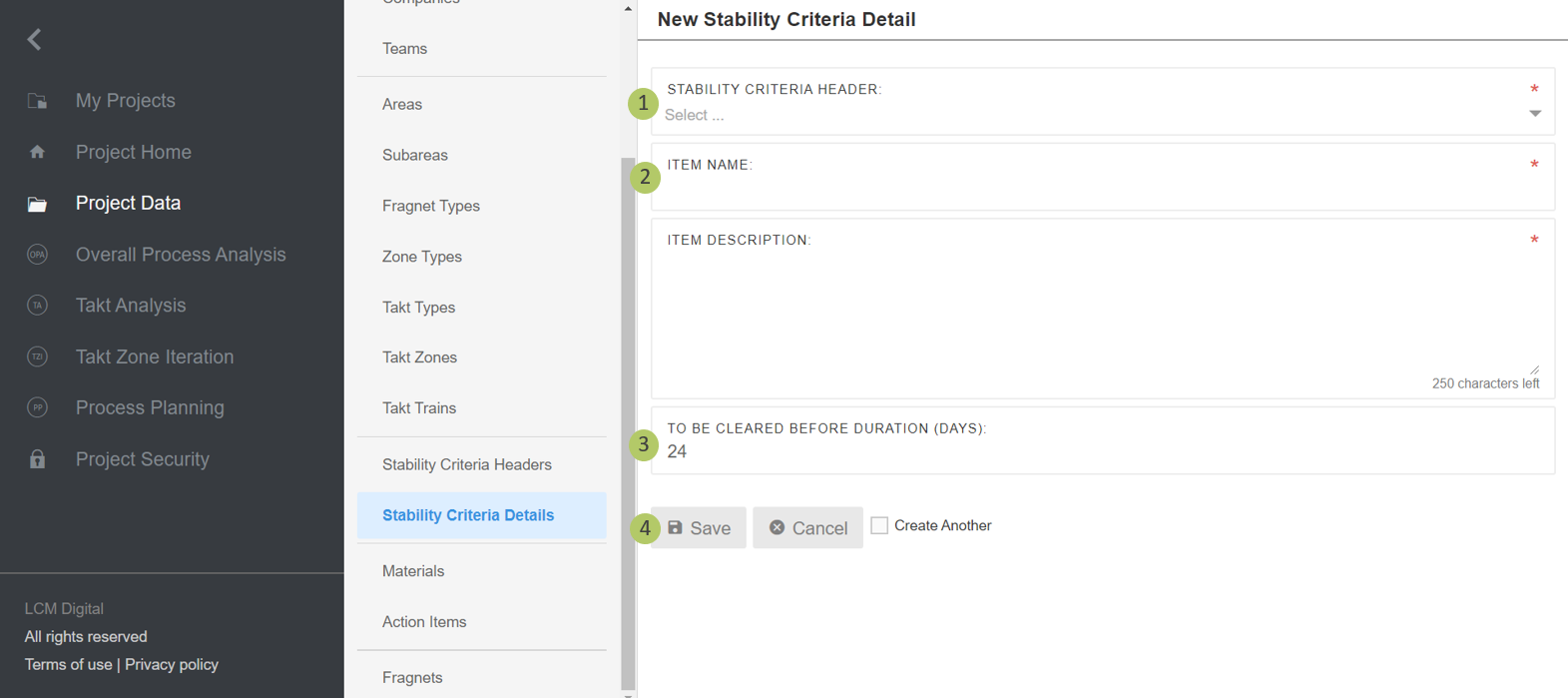
1. Type in the name for the Stability Criteria Detail.
2. Type the title for the item in the checklist.
3. Define how many days in advance, it should be check whether this item is available, in order to proceed with a process on time.
4. Click on Save to save the information and proceed.
Remove Stability Criteria Details
1. Select the item/s from the list of Stability Criteria Detail by clicking on the checkbox.
2. Click on Remove to delete the selected Stability Criteria Detail.
