
Extensions are add-ons that can be used to add additional functionality to LCM Digital. For example, you can use extensions to add custom input fields, such as "actual processing time" or custom "activity ID" for cards and processes.
The files with extensions are provided to you by the LCM Digital Support Team (support@lcmdigital.com) according to your requirements.

Add Extensions
- Navigate to the process plan in the project where you want to add the extensions.
- Click on the three dots in the upper right corner and select "LCMD Extensions".
- Select an extension file from your computer.
- The extension will be available immediately after upload.
NOTE: Re-inserting extensions in the same project will overwrite the existing data.
Where can I find the custom fields?
- You can find the change by clicking on "Process" on the right side of the process map and scrolling down to "Cards".
- Click on the name of a card.
- You will see the inserted extensions in the opened window.
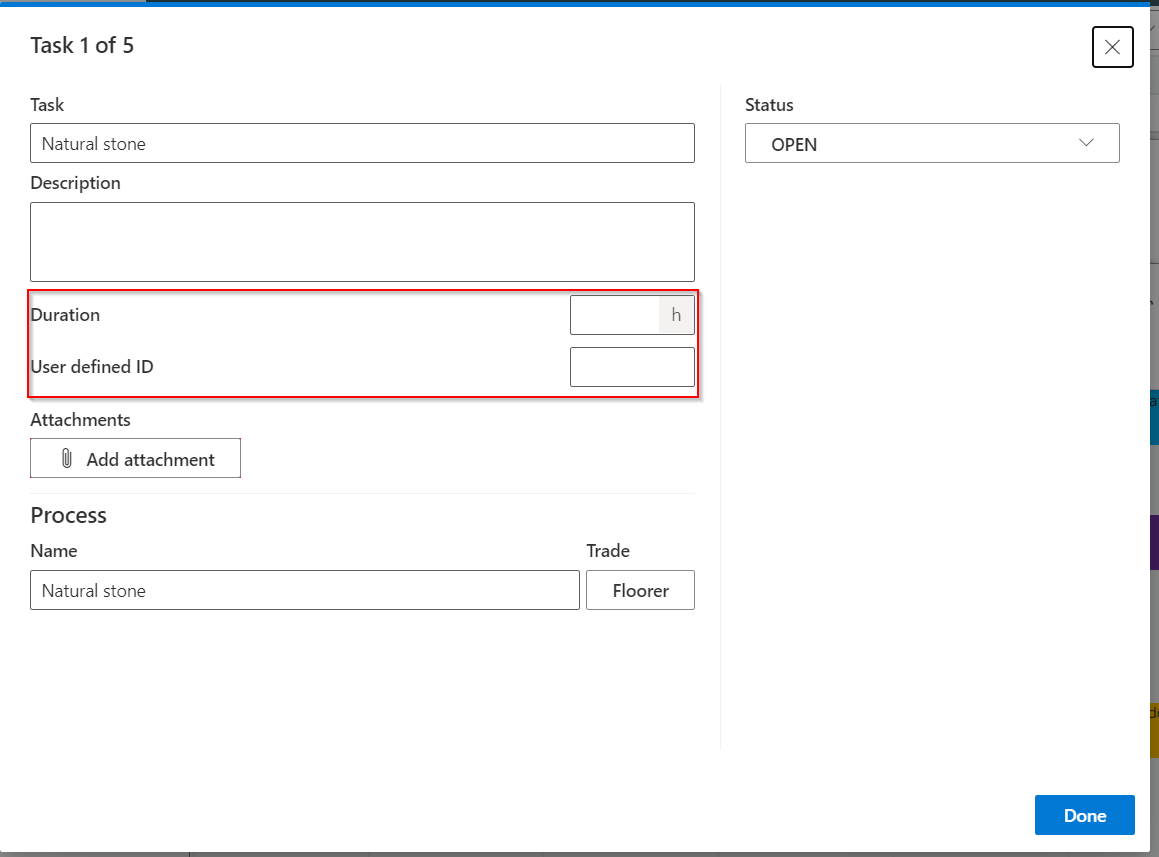
Which extensions are possible?
Extensions offer you the possibility to add new user-defined input fields in the process plan in the cards.
- Texts: You can add simple text fields to display additional information on maps.
- Durations: Maps are planned in LCM Digital for specific days. You can add more details if you want to include planned or executed durations of activities.
- Date with time: You can add exact times to maps. The date format is used according to your system setting (e.g. European 24 hour format)
- Numbers: In addition to duration, you can also enter other numbers, such as number of resources used.
- Dropdown with choices: e.g. for stability criteria (please be aware, that stability criteria are located above extensions in the feedback modus)
- Functions such as exporting maps or exporting processes as Excel data.
Contact us to map the desired extension for your needs: support@lcmdigital.com
Tags: Extension, custom fields